Data Models & Ontology
The Mosaico Data Ontology is the semantic backbone of the SDK. It defines the structural "rules" that transform raw binary streams into meaningful physical data, such as GPS coordinates, inertial measurements, or camera frames.
By using a strongly-typed ontology, Mosaico ensures that your data remains consistent, validatable, and highly optimized for both high-throughput transport and complex queries.
Core Philosophy
The ontology is designed to solve the "generic data" problem in robotics by ensuring every data object is:
- Validatable: Uses Pydantic for strict runtime type checking of sensor fields.
- Serializable: Automatically maps Python objects to efficient PyArrow schemas for high-speed binary transport.
- Queryable: Injects a fluent API (
.Q) into every class, allowing you to filter databases based on physical values (e.g.,IMU.Q.acceleration.x > 6.0). - Middleware-Agnostic: Acts as an abstraction layer so that your analysis code doesn't care if the data originally came from ROS, a simulator, or a custom logger.
Available Ontology Classes
The Mosaico SDK provides a comprehensive library of models that transform raw binary streams into validated, queryable Python objects. These are grouped by their physical and logical application below.
Base Data Models
API Reference
These models serve as timestamped, metadata-aware wrappers for standard primitives. They allow simple diagnostic or scalar values to be treated as first-class members of the platform.
| Module | Classes | Purpose |
|---|---|---|
| Primitives | String |
UTF-8 text data for logs or status messages. |
| Booleans | Boolean |
Logic flags (True/False). |
| Signed Integers | Integer8, Integer16, Integer32, Integer64 |
Signed whole numbers of varying bit-depth. |
| Unsigned Integers | Unsigned8, Unsigned16, Unsigned32, Unsigned64 |
Non-negative integers for counters or IDs. |
| Floating Point | Floating16, Floating32, Floating64 |
Real numbers for high-precision physical values. |
Geometry & Kinematics Models
API Reference
These structures define spatial relationships and the movement states of objects in 2D or 3D coordinate frames.
| Module | Classes | Purpose |
|---|---|---|
| Points & Vectors | Vector2d/3d/4d, Point2d/3d |
Fundamental spatial directions and locations. |
| Rotations | Quaternion |
Compact, singularity-free 3D orientation (). |
| Spatial State | Pose, Transform |
Absolute positions or relative coordinate frame shifts. |
| Motion | Velocity, Acceleration |
Linear and angular movement rates (Twists and Accels). |
| Aggregated State | MotionState |
An atomic snapshot combining Pose, Velocity, and Acceleration. |
Sensor Models
API Reference
High-level models representing physical hardware devices and their processed outputs.
| Module | Classes | Purpose |
|---|---|---|
| Inertial | IMU |
6-DOF inertial data: linear acceleration and angular velocity. |
| Navigation | GPS, GPSStatus, NMEASentence |
Geodetic fixes (WGS 84), signal quality, and raw NMEA strings. |
| Vision | Image, CompressedImage, CameraInfo, ROI |
Raw pixels, encoded streams (JPEG/H264), calibration, and regions of interest. |
| Environment | Temperature, Pressure, Range |
Thermal readings (K), pressure (Pa), and distance intervals (m). |
| Dynamics | ForceTorque |
3D force and torque vectors for load sensing. |
| Magnetic | Magnetometer |
Magnetic field vectors measured in microTesla (). |
| Robotics | RobotJoint |
States (position, velocity, effort) for index-aligned actuator arrays. |
Futures
API Reference
Prospective high-level models representing emerging or not yet fully standardized sensor hardware. The futures module acts as a transitional space where experimental ontologies are introduced and iteratively refined before being promoted to the stable, production-ready ontology set.
The following sensors are supported as first-class data types in this module:
| Model | Description |
|---|---|
| LiDAR | 3D point cloud data from laser-based ranging sensors, supporting full spatial geometry and optional intensity/RGB fields. |
| Radar | Range, velocity, and azimuth measurements from radio-frequency sensors, including Doppler-based target detection. |
| LaserScan | 2D planar sweep data from single-line laser rangefinders, encoded as ordered range and intensity arrays. |
| Multi-Echo LaserScan | Extension of LaserScan supporting multiple return echoes per beam, enabling richer surface characterization. |
| RGBD Camera | Paired color and depth frames from structured-light or time-of-flight RGB-D sensors. |
| Stereo Camera | Synchronized left/right image pairs from stereo rigs, suitable for disparity estimation and 3D reconstruction. |
| ToF Camera | Per-pixel depth and amplitude data from time-of-flight imaging sensors. |
| Grid Cells | Map representing a set of 2D cells with a given height and width. |
| Map Metadata | Represents metadata about the map, like it's width and height. Typically used in combination with OccupancyGrid. |
| Occupancy Grid | 2D map representing the probability of a cell of being occupied (100) by something or not (0). |
Experimental Ontologies
The futures module is a transitional area where ontologies under active experimentation are hosted before graduating to the stable ontology set. Field definitions, unit conventions, and structural relationships are not yet considered final and will be refined based on feedback from real-world integrations and adopters. Once an ontology reaches sufficient maturity and coverage, it will be promoted out of futures and into the core, production-ready modules.
MosaicoType & MosaicoField
When defining ontologies in the Mosaico SDK, every class attribute carries two pieces of information:
- Python type used by Pydantic for validation and IDE support.
- PyArrow type used for efficient columnar serialization to Parquet/Arrow.
MosaicoType and MosaicoField let you express both in a single annotation, providing a clean single-source-of-truth API for ontology field declarations.
You annotate each attribute once, and the Arrow schema is derived automatically at class-definition time by introspecting Pydantic's model_fields: no separate schema declaration to maintain, no risk of the two representations drifting apart.
Because the whole mechanism is built on top of Pydantic model fields via Annotated metadata, extending or customising field behaviour is as simple as adding standard Pydantic Field kwargs: no subclassing, no metaclass magic, no separate schema registry to maintain.
MosaicoType
API Reference
MosaicoType is a collection of Annotated type aliases. Each alias bundles the corresponding Python primitive type with its PyArrow counterpart as inline metadata, making the Arrow type immediately visible to the schema auto-builder without any additional configuration.
Scalar types
| Alias | Python type | Arrow type |
|---|---|---|
MosaicoType.uint8 |
int |
pa.uint8() |
MosaicoType.int8 |
int |
pa.int8() |
MosaicoType.uint16 |
int |
pa.uint16() |
MosaicoType.int16 |
int |
pa.int16() |
MosaicoType.uint32 |
int |
pa.uint32() |
MosaicoType.int32 |
int |
pa.int32() |
MosaicoType.uint64 |
int |
pa.uint64() |
MosaicoType.int64 |
int |
pa.int64() |
MosaicoType.float16 |
float |
pa.float16() |
MosaicoType.float32 |
float |
pa.float32() |
MosaicoType.float64 |
float |
pa.float64() |
MosaicoType.bool |
bool |
pa.bool_() |
MosaicoType.string |
str |
pa.string() |
MosaicoType.binary |
bytes |
pa.binary() |
Explicit type definition
Using MosaicoType provides precise control over the underlying PyArrow schema:
from mosaicolabs import MosaicoField, MosaicoType, Serializable

class MyOntology(Serializable):
    x: MosaicoType.float32
    y: Optional[MosaicoType.float32] = None
x: defined directly, will be converted in a not nullable PyArrow field.y: wrapped inOptional[...], will be converted in a nullable PyArrow field.
Using Fallback types
You can also use standard Python type hints.
Mosaico automatically maps these to specific PyArrow types.
In this scenario, the types are resolved using the following fallback mapping:
| Python type | PyArrow equivalent |
|---|---|
int |
pa.int64() |
float |
pa.float64() |
str |
pa.string() |
bool |
pa.bool_() |
bytes |
pa.binary() |
Note
Just like with explicit types, using Optional with fallback types will correctly define the PyArrow field as nullable. If Optional is not used, the field is defined as not nullable.
List types
For list fields, MosaicoType exposes a list_() static method that wraps a scalar type, either a MosaicoType alias or a raw Python primitive, into the appropriate pa.list_ Arrow type.
An optional list_size parameter produces a fixed-size list (pa.list_(type, size)), omitting it yields a variable-length list.
from mosaicolabs import MosaicoField, MosaicoField, Serializable

class MyOntology(Serializable):
    # Variable-length list of float32
    scores: Optional[MosaicoType.list_(MosaicoType.float32)] = None

    # Fixed-size list of 3 float32 (e.g. an RGB vector)
    color: MosaicoType.list_(MosaicoType.float32, list_size=3)

    # Works with raw Python primitives too
    tags: MosaicoType.list_(str)

    # Works with other Pydantic models with pyarrow struct
    vec: MosaicoType.list_(Vector3d)

    # Fallback List
    vec2: List[Vector2d]
list (or List from typing) generates a list of unfixed size in the underlying Arrow schema.
This means:
- The list can hold any number of elements at runtime.
- No size constraint is enforced at the schema level.
- This is equivalent to calling
MosaicoType.list_(str)with nolist_sizeargument.
MosaicoType.list_() accepts an optional list_size parameter. When provided, it maps to an Arrow fixed-size list (pa.list_(type, list_size=N)), which enforces that every value in the column contains exactly N elements.
list[str] |
MosaicoType.list_(str) |
MosaicoType.list_(str, 3) |
|
|---|---|---|---|
| Arrow type | pa.list_(pa.string()) |
pa.list_(pa.string()) |
pa.list_(pa.string(), 3) |
| Size enforced | No | No | Yes, exactly 3 |
| Interoperable with Pydantic | Yes | Yes | Yes |
| Supports nested models | Yes | Yes | Yes |
Use MosaicoType.list_() with a list_size argument when:
- The list represents a fixed-dimensional structure, such as a vector, a coordinate tuple, or an RGB triplet.
- You want the Arrow schema to statically encode the size, enabling optimised columnar storage and stricter validation.
- You are working with embedding vectors or other ML features where dimensionality is always known and constant.
If you do not pass a list_size argument, MosaicoType.list_(T) and list[T] produce
an identical Arrow schema. The choice then becomes a matter of style or explicitness:
tags: list[str]               # idiomatic Python - preferred for readability
tags: MosaicoType.list_(str)  # explicit Mosaico style - equivalent result
Note
Explicit type definition and fallback types properties still hold in this case.
Matrix types
For 2-D matrix fields, MosaicoType exposes a matrix() static method that composes two nested list_() calls to represent a rectangular grid of shape (rows, cols).
Both dimensions are optional: omitting a dimension produces a variable-length axis, while supplying an integer value produces a fixed-size axis via Arrow's pa.list_(type, list_size=N).
from mosaicolabs import MosaicoField, Serializable

class MyOntology(Serializable):
    # Fully variable matrix of float32
    heatmap: Optional[MosaicoType.matrix(MosaicoType.float32)] = None

    # Fixed 4×4 matrix
    t: MosaicoType.matrix(MosaicoType.float32, rows=4, cols=4)

    # Fixed-width rows, variable number of rows (e.g. token embeddings)
    embeddings: MosaicoType.matrix(MosaicoType.float32, cols=768)

    # Works with raw Python primitives too
    grid: MosaicoType.matrix(int, rows=8, cols=8)

    # Works also with other ontologies
    onto: MosaicoType.matrix(Vector3d)
matrix(T) |
matrix(T, cols=N) |
matrix(T, rows=M, cols=N) |
|
|---|---|---|---|
| Arrow type | pa.list_(pa.list_(T)) |
pa.list_(pa.list_(T, N)) |
pa.list_(pa.list_(T, N), M) |
| Row count enforced | No | No | Yes, exactly M |
| Column count enforced | No | Yes, exactly N | Yes, exactly N |
| Interoperable with Pydantic | Yes | Yes | Yes |
| Support nested models | Yes | Yes | Yes |
The same list_size trade-off from List types applies here, one dimension at a time: fix rows/cols when that dimension's size is a known, constant property of the data (e.g. a fixed-width embedding matrix), and leave it variable otherwise. If neither dimension is provided, MosaicoType.matrix(T) produces a fully variable nested list, equivalent to list[list[T]].
Tensor3d types
For 3-D tensor fields, MosaicoType exposes a tensor3d() static method that composes a matrix() call with an outer list_() call to represent a volume of shape (depth, rows, cols).
All three dimensions are optional and follow the same convention as matrix(): omitting a dimension yields a variable-length axis; supplying an integer value produces a fixed-size axis.
from mosaicolabs import MosaicoField, Serializable

class MyOntology(Serializable):
    # Fully variable 3-D tensor of float32
    volume: Optional[MosaicoType.tensor3d(MosaicoType.float32)] = None

    # Fixed-depth stack of variable matrices
    f: MosaicoType.tensor3d(MosaicoType.float32, depth=16)

    # Fully fixed tensor
    j: MosaicoType.tensor3d(MosaicoType.float32, depth=3, rows=4, cols=5)

    # Works with raw Python primitives too
    cube: MosaicoType.tensor3d(int, depth=8, rows=8, cols=8)

    # Works also with other Ontology model
    onto: MosaicoType.tensor3d(Vector3d)
tensor3d(T) |
tensor3d(T, depth=D) |
tensor3d(T, depth=D, rows=M, cols=N) |
|
|---|---|---|---|
| Arrow type | pa.list_(pa.list_(pa.list_(T))) |
pa.list_(pa.list_(pa.list_(T)), D) |
pa.list_(pa.list_(pa.list_(T, N), M), D) |
| Depth enforced | No | Yes, exactly D | Yes, exactly D |
| Row count enforced | No | No | Yes, exactly M |
| Column count enforced | No | No | Yes, exactly N |
| Interoperable with Pydantic | Yes | Yes | Yes |
| Support nested models | Yes | Yes | Yes |
The same per-dimension trade-off applies: fix depth/rows/cols when that dimension is a known, constant property of the data — e.g. all three for a fixed-shape volumetric structure such as convolutional layer outputs. If none of the dimensions are provided, MosaicoType.tensor3d(T) produces a fully variable nested list, equivalent to three nested list[list[list[T]]].
Custom Arrow types
For specialised Arrow types not covered by the built-in aliases, you can always use MosaicoType.annotate() method.
This utility allows you to embed a raw PyArrow type directly into your ontology while maintaining full compatibility with the Mosaico schema builder.
MosaicoType.annotate() is a helper designed to bridge standard Python types with specific PyArrow configurations
(like timestamp precision or timezones). It requires two arguments:
- The Python Fallback Type: Used for runtime validation and Python-side type hinting (e.g., int, str).
- The PyArrow Type: The specific pyarrow type object to be used in the schema.
from mosaicolabs import Serializable, MosaicoField
class MyOntology(Serializable):
    ts: MosaicoType.annotate(int, pa.timestamp("us", tz="UTC")) = MosaicoField(
        description="UTC timestamp.")
Migration Note
Using MosaicoType.annotate(int, ...) is functionally equivalent to the standard Annotated[int, ...], but it provides a more explicit and optimized path for the Mosaico schema builder to resolve complex Arrow types.
MosaicoField
API Reference
MosaicoField is a factory function that returns a standard Pydantic Field instance, adding Mosaico-specific semantics on top of the native pydantic.Field. Because the return type is a native Pydantic Field, every standard Pydantic feature like validators, aliases, model_fields introspection, works out of the box.
Basic usage
from mosaicolabs import MosaicoType, MosaicoField, Serializable

class MyPointOntology(Serializable):
    x:     MosaicoType.float32 = MosaicoField(description="X coordinate")
    y:     MosaicoType.float32 = MosaicoField(description="Y coordinate")
    label: Optional[MosaicoType.string] = MosaicoField(
        default=None, description="Point label")
    score: MosaicoType.float32 = MosaicoField(nullable=True)
With MosaicoField you can define the default value of your attribute, the nullable attribute of pyarrow field and also a description.
In particular you can omit nullable if your default = None, in this case nullable will be set to True automatically.
Nullability and Parquet V2
The nullable flag in MosaicoField controls whether the Arrow schema emits the field
as nullable. The default is False, fields are non-nullable unless explicitly stated
otherwise.
The distinction matters most when a reusable struct ontology is embedded inside a parent
ontology as an optional field. Consider a Quaternion: its individual components
(x, y, z, w) are logically required — a quaternion with missing components is
meaningless and cannot be constructed.
However, all four leaf fields must be declared as nullable due to how ParquetV2 handles
null optional columns during data reading. Consider a parent class such as IMU,
where orientation is declared as Optional[Quaternion]. If that column is null in
the Parquet file but the inner fields are not nullable in the schema, ParquetV2
cannot represent the absent struct correctly and instead reconstructs it as a
zero-initialised instance:
Declaring all leaf fields as nullable prevents this silent corruption: a fully-null
struct is preserved as None through the read/write round-trip, matching the original
intent of the Optional annotation.
class Quaternion(Serializable):
    x: MosaicoType.float32 = MosaicoField(description="X component", nullable=True)
    y: MosaicoType.float32 = MosaicoField(description="Y component", nullable=True)
    z: MosaicoType.float32 = MosaicoField(description="Z component", nullable=True)
    w: MosaicoType.float32 = MosaicoField(description="W component", nullable=True)
A parent ontology may choose to include the quaternion as an optional field — for example, a detection without orientation data is still valid. In that case the struct itself must also be nullable in the Arrow schema:
class DetectionOntology(Serializable):
    position: MosaicoType.float32 = MosaicoField(description="Position")

    # The quaternion struct as a whole is optional in this ontology,
    # but its internal fields remain required when it is present.
    orientation: Optional[QuaternionOntology] = MosaicoField(nullable=True, default=None)
Architecture
The ontology architecture relies on three primary abstractions: the Factory (Serializable), the Envelope (Message) and the Mixins
Serializable (The Factory)
API Reference
Every data payload in Mosaico inherits from the Serializable class. It manages the global registry of data types and ensures that the system knows exactly how to convert an ontology tag like "IMU" back into a Python class with a specific binary schema.
Serializable uses the __pydantic_init_subclass__ hook, which is automatically called whenever a developer defines a new subclass.
Serializable performs the following steps automatically:
- Generate the schema: Introspect
model_fieldsto extract the PyArrow type embedded in each field'sAnnotatedmetadata viaMosaicoTypealiases or rawAnnotated[T, pa.SomeType()]annotations and build the__msco_pyarrow_struct__automatically. - Generates Tag: If the class doesn't define
__ontology_tag__, it is set as the class name. - Registers Class: It adds the new class to the global types registry, keyed by
__registry_key__. For every hand-authored class this defaults to__ontology_tag__itself, so the two are interchangeable in practice; they only diverge for dynamically-resolved schema variants (see Advanced: Ingesting Unmodeled Ontologies). - Injects Query Proxy: It dynamically adds a
.Qattribute to the class, enabling the fluent query syntax (e.g.,MyCustomSensor.Q.voltage > 12.0).
The ontology tag is exactly the class name
Unlike some frameworks, Mosaico does not transform the class name to derive the tag (no snake_case or camelCase conversion): MyCustomSensor is tagged "MyCustomSensor", not "my_custom_sensor". This is a deliberate choice to avoid a mental mapping step between "the name in my code" and "the tag on the platform" - especially when querying Unmodeled ontologies, where you often only have the tag string (e.g. from a TopicHandler) and no class to derive it from in the first place.
Message (The Envelope)
API Reference
The Message class is the universal transport envelope for all data in the Mosaico platform. It pairs a payload (the sensor data) with a timestamp_ns, and serves as the "Source of Truth" for synchronization and spatial context. Mosaico uses timestamp_ns to order and index records in time, so all timestamps within the same Sequence must share a common origin.
Notice that timestamp_ns is not the sensor measurement time: it is the time at which the data distribution system (e.g. ROS DDS) makes the data available. The measurement time lives in a separate field, timestamp, inside the Header object carried by most Mosaico Ontologies, that is, inside the Message payload. Because sensors use different time origins (time since Epoch, time since sensor startup, ...), this Header timestamp cannot be used to index records in Mosaico.
So a Message carries two timestamps at different levels:
timestamp_ns— on the envelope, set by the distribution system (monotonic, monotonic within the Sequence).Header.timestamp— inside the payload, set by the sensor (sensor-dependent origin).
Example: a LiDAR captures a scan at timestamp = 1200.5 (seconds since the sensor booted, in its Header). The DDS publishes it a few milliseconds later, and Mosaico stamps the envelope with timestamp_ns = 8423000000 on the Sequence's monotonic clock. The first value says when the world was measured; the second says when the data entered the system.
| Message timestamp | Header timestamp | |
|---|---|---|
| Time Representation | Monotonic | Unix Time, System Time,... (sensor dependent) |
| Sensor measurement timestamp | No | Yes |
| Common origin within all topics in Sequence | Yes | No |
| Must be specified | Yes | No |
from mosaicolabs import Message, Time, Temperature

# Create a Temperature message with unified envelope metadata
meas_time = Time.now()

temp_msg = Message(
    timestamp_ns=meas_time.to_nanoseconds(),  # Primary synchronization clock
    data=Temperature.from_celsius(
        value=57,
        variance=0.03
    )
)
While logically a Message contains a data object, the physical representation on the wire (PyArrow/Parquet) is flattened,
ensuring zero-overhead access to nested data during queries while maintaining a clean, object-oriented API in Python.
- Logical:
Message(timestamp_ns=123, data=IMU(acceleration=Vector3d(x=1.0,...))) - Physical:
Struct(timestamp_ns=123, acceleration, ...)
The Message mechanism enables a flexible dual-usage pattern for every Mosaico ontology type, supporting both Standalone Messages and Embedded Fields.
Standalone Messages
Any Serializable type (from elementary types like String and Float32 to complex sensors like IMU) can be used as a standalone message. When assigned to the data field of a Message envelope, the type represents an independent data stream with its own global timestamp and metadata, that can be pushed via a dedicated TopicWriter.
This is ideal for pushing processed signals, debug values, or simple sensor readings.
# Sending a raw Vector3d (no Header) as a timestamped standalone message with its own uncertainty
accel_msg = Message(
    timestamp_ns=ts,
    data=Vector3d(
        x=0.0,
        y=0.0,
        z=9.81,
        covariance=[0.01, 0, 0, 0, 0.01, 0, 0, 0, 0.01]  # 3x3 Diagonal matrix
    )
)

accel_writer.push(message=accel_msg)

# Sending a raw String as a timestamped standalone message
log_msg = Message(
    timestamp_ns=ts,
    data=String(data="Waypoint-miss in navigation detected!")
)

log_writer.push(message=log_msg)
Embedded Fields
Serializable types can also be embedded as internal fields within a larger structure. In this context, they behave as standard data types. While the parent Message provides the global temporal context, the embedded fields can carry their own granular attributes, such as unique uncertainty matrices.
# Embedding Vector3d inside a complex IMU model
imu_payload = IMU(
    # Embedded Field 1: Acceleration with its own specific uncertainty
    acceleration=Vector3d(
        x=0.5, y=-0.2, z=9.8,
        covariance=[0.1, 0, 0, 0, 0.1, 0, 0, 0, 0.1]
    ),
    # Embedded Field 2: Angular Velocity
    angular_velocity=Vector3d(x=0.0, y=0.0, z=0.0)
)

# Wrap the complex payload in the Message envelope
imu_writer.push(Message(timestamp_ns=ts, data=imu_payload))
Mixins: Uncertainty & Robustness
Mosaico uses Mixins to inject standard uncertainty fields across different data types, ensuring a consistent interface for sensor fusion and error analysis. These fields are typically used to represent the precision of the sensor data.
CovarianceMixin
API Reference
Injects multidimensional uncertainty fields, typically used for flattened covariance matrices (e.g., 3x3 or 6x6) in sensor fusion applications.
class MySensor(Serializable, CovarianceMixin):
    # Automatically receives covariance and covariance_type fields
    ...
VarianceMixin
API Reference
Injects monodimensional uncertainty fields, useful for sensors with 1-dimensional uncertain data like Temperature or Pressure.
class MySensor(Serializable, VarianceMixin):
    # Automatically receives variance and variance_type fields
    ...
By leveraging these mixins, the platform can perform deep analysis on data quality—such as filtering for only "high-confidence" segments—without requiring unique logic for every sensor type.
HeaderMixin
API Reference
Injects a Header field containing:
timestamp— the time at which the measurement was takenframe_id— the reference frame of the measurementsample_counter— the number of samples produced so far
By leveraging these mixins, the platform can perform deep analysis on data quality—such as filtering for only "reference-frame" or "measurement time".
Extending with Mixins
One of the most powerful consequences of building on top of Pydantic model fields is how natural mixin composition becomes. Because every field, including its Arrow type metadata, lives in model_fields, you can split concerns into focused mixin classes and combine them freely without any additional registration or schema merging step.
from mosaicolabs import BaseModel, MosaicoType, MosaicoField, Serializable


class GeometryMixin(BaseModel):
    x: MosaicoType.float32 = MosaicoField(description="X coordinate")
    y: MosaicoType.float32 = MosaicoField(description="Y coordinate")
    z: MosaicoType.float32 = MosaicoField(description="Z coordinate")


class ConfidenceMixin(BaseModel):
    confidence: MosaicoType.float32 = MosaicoField(description="Detection score [0, 1]")

class MetadataMixin(BaseModel):
    label:     Optional[MosaicoType.string] = MosaicoField(default=None, nullable=True)
    sensor_id: MosaicoType.string = MosaicoField(description="Source sensor identifier")
    ts: Annotated[int, pa.timestamp("us", tz="UTC")]

# Combine mixins, the Arrow schema aggregates all fields automatically
class DetectionOntology(Serializable, GeometryMixin, ConfidenceMixin, MetadataMixin):
    pass
When DetectionOntology is defined, __pydantic_init_subclass__ calls _build_ontology_struct, which walks the full model_fields MRO chain, extracts the PyArrow metadata from each Annotated annotation, and produces a single consolidated pa.struct, no extra code required.
This makes ontology composition additive by default: add a mixin to inherit its fields, remove it to drop them. The schema stays consistent with zero boilerplate.
Advanced: Ingesting Unmodeled Ontologies
Every ontology described so far is a hand-authored Serializable subclass: a Python class whose fields, via MosaicoType/MosaicoField, deterministically produce the Arrow schema used for storage and querying. This works well when you control the data source and can write (or generate) a class for every data type up front.
In practice, that isn't always possible. The Mosaico backend has no notion of Python classes at all; it only requires data to be representable as an Arrow schema. The "must be a Python class" requirement is purely an SDK-side convenience, and it becomes a real limitation when ingesting data whose schema is only known at runtime, or whose variety is too large to model by hand. The canonical example is a ROS bag ingestion via the ROS Bridge: a bag can reference dozens of message types, and requiring every single one to have a hand-written, adapted SDK class before it can be ingested would make onboarding a new robot, sensor, or message version a blocking, manual step.
Unmodeled closes this gap: it wraps an arbitrary PyArrow schema into a fully serializable, queryable ontology class at runtime, with no Python class definition required.
API Reference
How it works
Where a normal Serializable subclass declares one typed field per schema field and derives a PyArrow schema from those fields, Unmodeled inverts the relationship: it declares a single generic raw_data: Dict[str, Any] field, and instead takes the Arrow schema as an input, attaching it directly to the class.
The make_unmodeled_ontology_class() factory produces this class dynamically, given a tag, a schema, and a serialization format:
import pyarrow as pa
from mosaicolabs.enum import SerializationFormat
from mosaicolabs.models.core.unmodeled import make_unmodeled_ontology_class

UnmodeledGyro = make_unmodeled_ontology_class(
    class_name="UnmodeledGyro",
    ontology_tag=None, # Will inherit the class name
    serialization_format=SerializationFormat.Default,
    pyarrow_schema=pa.struct([
        pa.field("gyro", pa.struct([
            pa.field("x", pa.float32()),
            pa.field("y", pa.float32()),
            pa.field("z", pa.float32()),
        ])),
    ]),
)

# From here on, UnmodeledGyro behaves exactly like a hand-authored ontology:
# it's registered, serializable, and queryable.
gyro_writer.push(Message(
    timestamp_ns=ts,
    # The `raw_data` payload must match the declared schema
    data=UnmodeledGyro(raw_data={"gyro": {"x": 0.1, "y": 0.0, "z": -0.2}}),
))
Because the .Q query proxy is built directly from the class's PyArrow schema rather than from Python field declarations, an Unmodeled class is just as queryable as any hand-authored one out of the box: UnmodeledGyro.Q.gyro.x.gt(1.0) works without any extra step.
Validation
Every Unmodeled instance validates raw_data against the class's declared schema at construction time: missing required fields, unknown fields, and nested-object type mismatches all raise a ValueError immediately, rather than surfacing later as an opaque error during serialization.
Resolving Classes Automatically
make_unmodeled_ontology_class() is the low-level factory, not intended for direct use. In practice, most callers, including the SDK's own reading path (TopicDataStreamer, SequenceDataStreamer), go through resolve_ontology_class() instead, which adds two behaviors on top:
- Reuse before creation: if a class is already registered for the given tag, it's returned directly instead of creating a duplicate.
- Schema-variant safety: a single ontology tag can legitimately end up associated with more than one schema shape over time — for example, two rosbags recorded with different versions of the same ROS message type, both mapped by the translation layer to the same inferred tag.
resolve_ontology_class()handles this in three steps:- When the schema passed in doesn't match what's already registered for that tag, it does not silently decode the second version against the first version's schema.
- Instead, it computes a short, deterministic fingerprint of the schema and resolves (or creates) a distinct variant class for it — a separate Python class with its own
__registry_key__(f"{tag}__{fingerprint}"), so the SDK can always tell the two schemas apart locally. - Both variants still report the same
ontology_tagto the platform, so all of their data remains ingestible and queryable under one consistent, predictable tag — regardless of which schema version a given process happens to encounter first.
This is what makes it safe for a component like the ROS Bridge to translate an unadapted message type into a PyArrow schema and call resolve_ontology_class(ontology_tag=..., schema=...) for every message, without having to track class identity or schema versions itself.
Schema canonization
This is an internal detail the SDK handles for you automatically; it's documented here for readers debugging an unexpected schema-variant resolution, not something you need to act on day-to-day.
- The DataFusion context: for performance reasons, the platform's query engine (DataFusion) rewrites certain top-level fields of a schema when storing data:
pa.string()/pa.large_string()come back aspa.string_view(), andpa.binary()/pa.large_binary()come back aspa.binary_view(). This only applies to fields sitting directly at the top level of the schema, not to string/binary fields nested inside a struct. For example, a top-level field likeMotionState.target_frame_idcomes back asstring_view, whileHeader.frame_id— nested insideIMUviaHeaderMixin— stays a plainstring; if aMessageof typeHeaderis sent directly,frame_idbecomes top-level and is rewritten too. - Why it matters: a naive fingerprint comparison between a class's own locally-built schema (
string/binary) and the schema echoed back by the server (string_view/binary_viewat the top level) would treat them as different schemas — misidentifying a perfectly ordinary, correctly modeled ontology as a schema variant (or asUnmodeled), purely because of this server-side rewrite. - How it's resolved: the schema fingerprint canonizes top-level
string/large_stringfields tostring_viewand top-levelbinary/large_binaryfields tobinary_viewbefore hashing, mirroring exactly what DataFusion does and only at the same depth. Nested struct fields and list element types are left untouched, since the server doesn't rewrite those either.
Retrieving Unmodeled Data from a Message
On the reading side, Message.get_data() is a type-hinted accessor: you pass the class you expect the payload to be, and it hands back self.data cast to that type (or None if it isn't an instance of it). For a hand-authored ontology this is straightforward (msg.get_data(IMU)) but for unmodeled data you don't necessarily know, or need to know, the exact dynamically-generated class the SDK resolved the message into. However, every dynamically-generated class is a subclass of Unmodeled, so get_data(Unmodeled) always works and immediately unveils the raw_data field to your editor's autocompletion and to static type checkers, with no upfront setup:
from mosaicolabs import MosaicoClient
from mosaicolabs.models.core.unmodeled import Unmodeled

with MosaicoClient.connect("localhost", 6726) as client:
    th = client.topic_handler("mission_alpha", "/sensors/gyro/no_schema")

    for msg in th.get_data_streamer():
        data = msg.get_data(Unmodeled)  # data: Optional[Unmodeled]
        print(data.raw_data)
Querying Data Ontology with the Query (.Q) Proxy
The Mosaico SDK allows you to perform deep discovery directly on the physical content of your sensor streams. Every class inheriting from Serializable, including standard sensors, geometric primitives, and custom user models, is automatically injected with a static .Q proxy attribute.
This proxy acts as a type-safe bridge between your Python data models and the platform's search engine, enabling you to construct complex filters using standard Python dot notation.
How the Proxy Works
The .Q proxy recursively inspects the model’s schema to expose every queryable field path. It identifies the data type of each field and provides only the operators valid for that type (e.g., numeric comparisons for acceleration, glob-style wildcard matches via .match() for frame IDs).
- Direct Field Access: Filter based on primary values, such as
Temperature.Q.value.gt(25.0). - Nested Navigation: Traverse complex, embedded structures. For example, in the
GPSmodel, you can drill down into the status sub-field:GPS.Q.status.satellites.geq(8). - Mixin Integration: Fields inherited from mixins are automatically included in the proxy. This allows you to query uncertainty metrics (from
VarianceMixinorCovarianceMixin) across any model.
Queryability Examples
The following table illustrates how the proxy flattens complex hierarchies into queryable paths:
| Type Field Path | Proxy Field Path | Source Type | Queryable Type | Supported Operators |
|---|---|---|---|---|
IMU.acceleration.x |
IMU.Q.acceleration.x |
float |
Numeric | .eq(), .lt(), .gt(), .leq(), .geq(), .in_(), .between() |
GPS.status.hdop |
GPS.Q.status.hdop |
float |
Numeric | .eq(), .lt(), .gt(), .leq(), .geq(), .in_(), .between() |
IMU.frame_id |
IMU.Q.frame_id |
str |
String | .eq(), .match(), .in_(), .lt(), .gt(), .leq(), .geq() |
GPS.covariance_type |
GPS.Q.covariance_type |
int |
Numeric | .eq(), .lt(), .gt(), .leq(), .geq(), .in_(), .between() |
Practical Usage
To execute these filters, pass the expressions generated by the proxy to the QueryOntologyCatalog builder:
from mosaicolabs import MosaicoClient, IMU, GPS, QueryOntologyCatalog

with MosaicoClient.connect("localhost", 6726) as client:
    # orchestrate a query filtering by physical thresholds AND metadata
    qresponse = client.query(
        QueryOntologyCatalog()
        .with_expression(IMU.Q.acceleration.z.gt(15.0))
        .with_expression(GPS.Q.status.service.eq(2))
    )
See the Full Query Documentation for how to iterate the returned QueryResponse and extract time intervals from it.
For a comprehensive list of all supported operators and advanced filtering strategies (such as query chaining), see the Full Query Documentation and the Ontology types SDK Reference in the API Reference:
API Reference
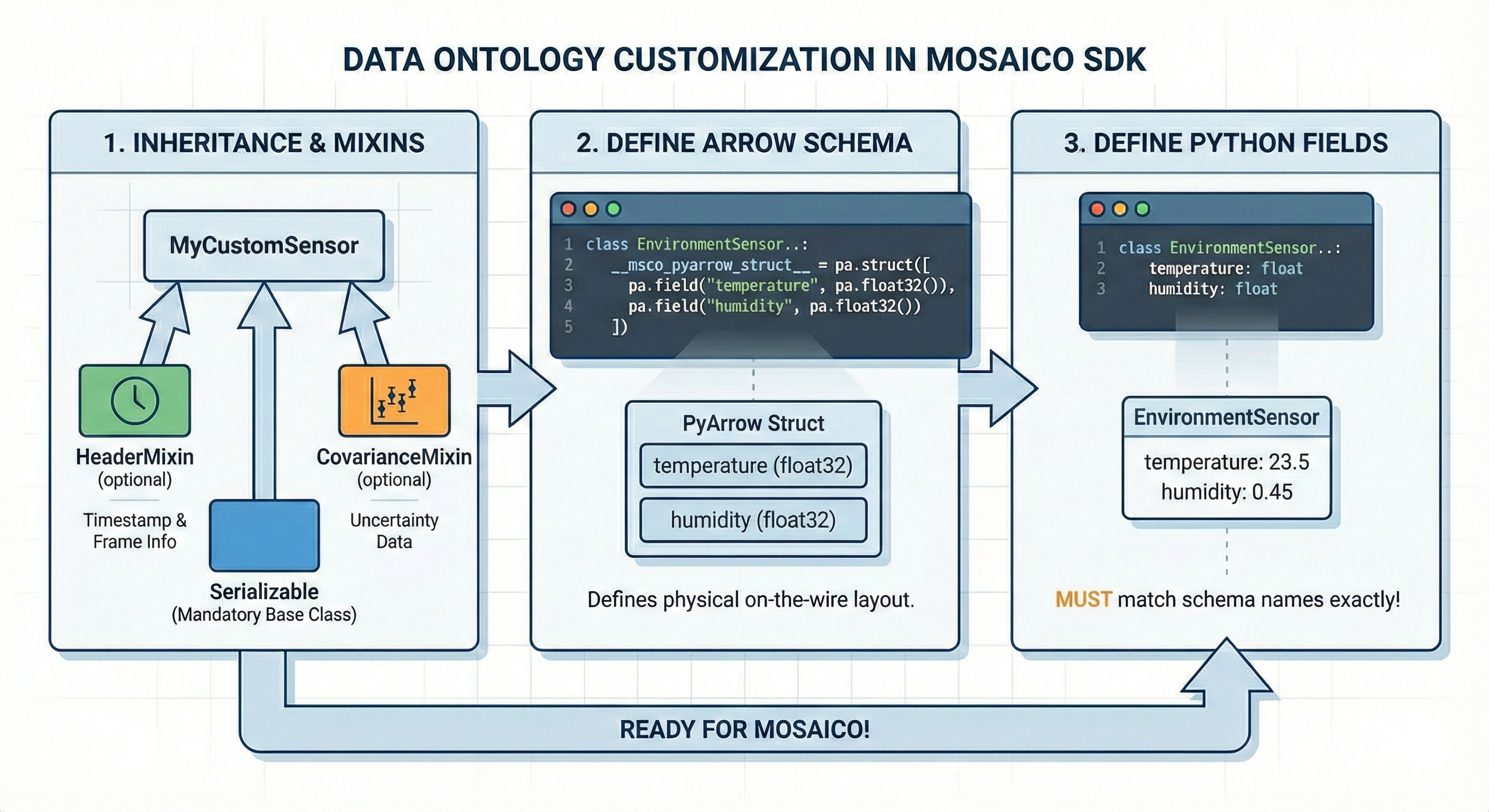
Customizing the Ontology
The Mosaico SDK is built for extensibility, allowing you to define domain-specific data structures that can be registered to the platform and live alongside standard types. Custom types are automatically validatable, serializable, and queryable once registered in the platform.
Follow these two steps to implement a compatible custom data type:
1. Inheritance and Mixins
Your custom class must inherit from Serializable to enable auto-registration, factory creation, and the queryability of the model.
To align with the Mosaico ecosystem, use the following mixins:
CovarianceMixin: Used for data including measurement uncertainty, standardizing the storage of covariance matrices.
2. Define the Wire Schema
Annotate each field with a MosaicoType alias and wrap it with MosaicoField. Fields and schema are declared together in a single annotation — the __msco_pyarrow_struct__ is derived automatically from model_fields at class-definition time, so there is no separate schema declaration to maintain.
2.1 Serialization Format Optimization
API Reference
You can optimize remote server performance by overriding the __serialization_format__ attribute. This controls how the server compresses and organizes your data.
| Format | Identifier | Use Case Recommendation |
|---|---|---|
| Default | "default" |
Standard Table: Fixed-width data with a constant number of fields. |
| Ragged | "ragged" |
Variable Length: Best for lists, sequences, or point clouds. |
| Image | "image" |
Blobs: Raw or compressed images requiring specialized codec handling. |
If not explicitly set, the system defaults to Default format.
Customization Example: EnvironmentSensor
This example demonstrates a custom sensor for environmental monitoring that tracks temperature, humidity, and pressure.
# file: custom_ontology.py

from typing import Optional
import pyarrow as pa
from mosaicolabs import HeaderMixin, MosaicoField, MosaicoType, Serializable

class EnvironmentSensor(Serializable, HeaderMixin):
    """
    Custom sensor reading for Temperature, Humidity, and Pressure.
    """

    # --- 1. Define the Wire Schema ---
    temperature: MosaicoType.float32

    humidity: Optional[MosaicoType.float32] = MosaicoField(
            default= None, nullable=True)

    pressure: Optional[MosaicoType.float32] = MosaicoField(
            default= None, nullable=True)


# --- Usage Example ---
from mosaicolabs import Message, Header, Time

# Initialize with standard metadata
meas = EnvironmentSensor(
    header=Header(timestamp=Time.now(), frame_id="lab_sensor_1"),
    temperature=23.5,
    humidity=0.45
)

# Ready for streaming or querying
# writer.push(Message(timestamp_ns=ts, data=meas))