Data Models & Ontology
The Mosaico Data Ontology is the semantic backbone of the SDK. It defines the structural "rules" that transform raw binary streams into meaningful physical data, such as GPS coordinates, inertial measurements, or camera frames.
By using a strongly-typed ontology, Mosaico ensures that your data remains consistent, validatable, and highly optimized for both high-throughput transport and complex queries.
Core Philosophy
The ontology is designed to solve the "generic data" problem in robotics by ensuring every data object is:
- Validatable: Uses Pydantic for strict runtime type checking of sensor fields.
- Serializable: Automatically maps Python objects to efficient PyArrow schemas for high-speed binary transport.
- Queryable: Injects a fluent API (
.Q) into every class, allowing you to filter databases based on physical values (e.g.,IMU.Q.acceleration.x > 6.0). - Middleware-Agnostic: Acts as an abstraction layer so that your analysis code doesn't care if the data originally came from ROS, a simulator, or a custom logger.
Available Ontology Classes
The Mosaico SDK provides a comprehensive library of models that transform raw binary streams into validated, queryable Python objects. These are grouped by their physical and logical application below.
Base Data Models
API Reference: Base Data Types
These models serve as timestamped, metadata-aware wrappers for standard primitives. They allow simple diagnostic or scalar values to be treated as first-class members of the platform.
| Module | Classes | Purpose |
|---|---|---|
| Primitives | String, LargeString |
UTF-8 text data for logs or status messages. |
| Booleans | Boolean |
Logic flags (True/False). |
| Signed Integers | Integer8, Integer16, Integer32, Integer64 |
Signed whole numbers of varying bit-depth. |
| Unsigned Integers | Unsigned8, Unsigned16, Unsigned32, Unsigned64 |
Non-negative integers for counters or IDs. |
| Floating Point | Floating16, Floating32, Floating64 |
Real numbers for high-precision physical values. |
Geometry & Kinematics Models
API Reference: Geometry Models
These structures define spatial relationships and the movement states of objects in 2D or 3D coordinate frames.
| Module | Classes | Purpose |
|---|---|---|
| Points & Vectors | Vector2d/3d/4d, Point2d/3d |
Fundamental spatial directions and locations. |
| Rotations | Quaternion |
Compact, singularity-free 3D orientation (). |
| Spatial State | Pose, Transform |
Absolute positions or relative coordinate frame shifts. |
| Motion | Velocity, Acceleration |
Linear and angular movement rates (Twists and Accels). |
| Aggregated State | MotionState |
An atomic snapshot combining Pose, Velocity, and Acceleration. |
Sensor Models
API Reference: Sensor Models
High-level models representing physical hardware devices and their processed outputs.
| Module | Classes | Purpose |
|---|---|---|
| Inertial | IMU |
6-DOF inertial data: linear acceleration and angular velocity. |
| Navigation | GPS, GPSStatus, NMEASentence |
Geodetic fixes (WGS 84), signal quality, and raw NMEA strings. |
| Vision | Image, CompressedImage, CameraInfo, ROI |
Raw pixels, encoded streams (JPEG/H264), calibration, and regions of interest. |
| Environment | Temperature, Pressure, Range |
Thermal readings (K), pressure (Pa), and distance intervals (m). |
| Dynamics | ForceTorque |
3D force and torque vectors for load sensing. |
| Magnetic | Magnetometer |
Magnetic field vectors measured in microTesla (). |
| Robotics | RobotJoint |
States (position, velocity, effort) for index-aligned actuator arrays. |
Architecture
The ontology architecture relies on three primary abstractions: the Factory (Serializable), the Envelope (Message) and the Mixins
Serializable (The Factory)
API Reference: mosaicolabs.models.Serializable
Every data payload in Mosaico inherits from the Serializable class. It manages the global registry of data types and ensures that the system knows exactly how to convert a string tag like "imu" back into a Python class with a specific binary schema.
Serializable uses the __init_subclass__ hook, which is automatically called whenever a developer defines a new subclass.
Serializable performs the following steps automatically:
- Validates Schema: Checks if the subclass defined the PyArrow struct schema (
__msco_pyarrow_struct__). If missing, it raises an error at definition time (import time), preventing runtime failures later. - Generates Tag: If the class doesn't define
__ontology_tag__, it auto-generates one from the class name (e.g.,MyCustomSensor->"my_custom_sensor"). - Registers Class: It adds the new class to the global types registry.
- Injects Query Proxy: It dynamically adds a
.Qattribute to the class, enabling the fluent query syntax (e.g.,MyCustomSensor.Q.voltage > 12.0).
Message (The Envelope)
API Reference: mosaicolabs.models.Message
The Message class is the universal transport envelope for all data within the Mosaico platform. It acts as the "Source of Truth" for synchronization and spatial context, combining specific sensor data (the payload) with critical middleware-level metadata. By centralizing metadata at the envelope level, Mosaico ensures that every data point—regardless of its complexity—carries a consistent temporal and spatial identity.
from mosaicolabs import Message, Time, Temperature

# Create a Temperature message with unified envelope metadata
meas_time = Time.now()

temp_msg = Message(
    timestamp_ns=meas_time.to_nanoseconds(),  # Primary synchronization clock
    frame_id="comp_case",                     # Spatial reference frame
    seq_id=101,                               # Optional sequence ID for ordering
    data=Temperature.from_celsius(
        value=57,
        variance=0.03
    )
)
While logically a Message contains a data object, the physical representation on the wire (PyArrow/Parquet) is flattened,
ensuring zero-overhead access to nested data during queries while maintaining a clean, object-oriented API in Python.
- Logical:
Message(timestamp_ns=123, frame_id="map", data=IMU(acceleration=Vector3d(x=1.0,...))) - Physical:
Struct(timestamp_ns=123, frame_id="map", seq_id=null, acceleration, ...)
The Message mechanism enables a flexible dual-usage pattern for every Mosaico ontology type, supporting both Standalone Messages and Embedded Fields.
Standalone Messages
Any Serializable type (from elementary types like String and Float32 to complex sensors like IMU) can be used as a standalone message. When assigned to the data field of a Message envelope, the type represents an independent data stream with its own global timestamp and metadata, that can be pushed via a dedicated TopicWriter.
This is ideal for pushing processed signals, debug values, or simple sensor readings.
# Sending a raw Vector3d as a timestamped standalone message with its own uncertainty
accel_msg = Message(
    timestamp_ns=ts,
    frame_id="base_link",
    data=Vector3d(
        x=0.0,
        y=0.0,
        z=9.81,
        covariance=[0.01, 0, 0, 0, 0.01, 0, 0, 0, 0.01]  # 3x3 Diagonal matrix
    )
)

accel_writer.push(message=accel_msg)

# Sending a raw String as a timestamped standalone message
log_msg = Message(
    timestamp_ns=ts,
    frame_id="base_link",
    data=String(data="Waypoint-miss in navigation detected!")
)

log_writer.push(message=log_msg)
Embedded Fields
Serializable types can also be embedded as internal fields within a larger structure. In this context, they behave as standard data types. While the parent Message provides the global temporal context, the embedded fields can carry their own granular attributes, such as unique uncertainty matrices.
# Embedding Vector3d inside a complex IMU model
imu_payload = IMU(
    # Embedded Field 1: Acceleration with its own specific uncertainty
    # Here the Vector3d instance inherits the timestamp and frame_id
    # from the parent IMU Message.
    acceleration=Vector3d(
        x=0.5, y=-0.2, z=9.8,
        covariance=[0.1, 0, 0, 0, 0.1, 0, 0, 0, 0.1]
    ),
    # Embedded Field 2: Angular Velocity
    angular_velocity=Vector3d(x=0.0, y=0.0, z=0.0)
)

# Wrap the complex payload in the Message envelope
imu_writer.push(Message(timestamp_ns=ts, frame_id="imu_link", data=imu_payload))
Mixins: Uncertainty & Robustness
Mosaico uses Mixins to inject standard uncertainty fields across different data types, ensuring a consistent interface for sensor fusion and error analysis. These fields are typically used to represent the precision of the sensor data.
CovarianceMixin
API Reference: mosaicolabs.models.mixins.CovarianceMixin
Injects multidimensional uncertainty fields, typically used for flattened covariance matrices (e.g., 3x3 or 6x6) in sensor fusion applications.
class MySensor(Serializable, CovarianceMixin):
    # Automatically receives covariance and covariance_type fields
    ...
VarianceMixin
API Reference: mosaicolabs.models.mixins.VarianceMixin
Injects monodimensional uncertainty fields, useful for sensors with 1-dimensional uncertain data like Temperature or Pressure.
class MySensor(Serializable, VarianceMixin):
    # Automatically receives variance and variance_type fields
    ...
By leveraging these mixins, the platform can perform deep analysis on data quality—such as filtering for only "high-confidence" segments—without requiring unique logic for every sensor type.
Querying Data Ontology with the Query (.Q) Proxy
The Mosaico SDK allows you to perform deep discovery directly on the physical content of your sensor streams. Every class inheriting from Serializable, including standard sensors, geometric primitives, and custom user models, is automatically injected with a static .Q proxy attribute.
This proxy acts as a type-safe bridge between your Python data models and the platform's search engine, enabling you to construct complex filters using standard Python dot notation.
How the Proxy Works
The .Q proxy recursively inspects the model’s schema to expose every queryable field path. It identifies the data type of each field and provides only the operators valid for that type (e.g., numeric comparisons for acceleration, substring matches for frame IDs).
- Direct Field Access: Filter based on primary values, such as
Temperature.Q.value.gt(25.0). - Nested Navigation: Traverse complex, embedded structures. For example, in the
GPSmodel, you can drill down into the status sub-field:GPS.Q.status.satellites.geq(8). - Mixin Integration: Fields inherited from mixins are automatically included in the proxy. This allows you to query uncertainty metrics (from
VarianceMixinorCovarianceMixin) across any model.
Queryability Examples
The following table illustrates how the proxy flattens complex hierarchies into queryable paths:
| Type Field Path | Proxy Field Path | Source Type | Queryable Type | Supported Operators |
|---|---|---|---|---|
IMU.acceleration.x |
IMU.Q.acceleration.x |
float |
Numeric | .eq(), .neq(), .lt(), .gt(), .leq(), .geq(), .in_(), .between() |
GPS.status.hdop |
GPS.Q.status.hdop |
float |
Numeric | .eq(), .neq(), .lt(), .gt(), .leq(), .geq(), .in_(), .between() |
IMU.frame_id |
IMU.Q.frame_id |
str |
String | .eq(), .neq(), .match(), .in_() |
GPS.covariance_type |
GPS.Q.covariance_type |
int |
Numeric | .eq(), .neq(), .lt(), .gt(), .leq(), .geq(), .in_(), .between() |
Practical Usage
To execute these filters, pass the expressions generated by the proxy to the QueryOntologyCatalog builder.
from mosaicolabs import MosaicoClient, IMU, GPS, QueryOntologyCatalog

with MosaicoClient.connect("localhost", 6726) as client:
    # orchestrate a query filtering by physical thresholds AND metadata
    qresponse = client.query(
        QueryOntologyCatalog(include_timestamp_range=True) # Ask for the start/end timestamps of occurrences
        .with_expression(IMU.Q.acceleration.z.gt(15.0))
        .with_expression(GPS.Q.status.service.eq(2))
    )

    # The server returns a QueryResponse grouped by Sequence for structured data management
    if qresponse is not None:
        for item in qresponse:
            # 'item.sequence' contains the name for the matched sequence
            print(f"Sequence: {item.sequence.name}")

            # 'item.topics' contains only the topics and time-segments
            # that satisfied the QueryOntologyCatalog criteria
            for topic in item.topics:
                # Access high-precision timestamps for the data segments found
                start, end = topic.timestamp_range.start, topic.timestamp_range.end
                print(f"  Topic: {topic.name} | Match Window: {start} to {end}")
For a comprehensive list of all supported operators and advanced filtering strategies (such as query chaining), see the Full Query Documentation and the Ontology types SDK Reference in the API Reference:
Customizing the Ontology
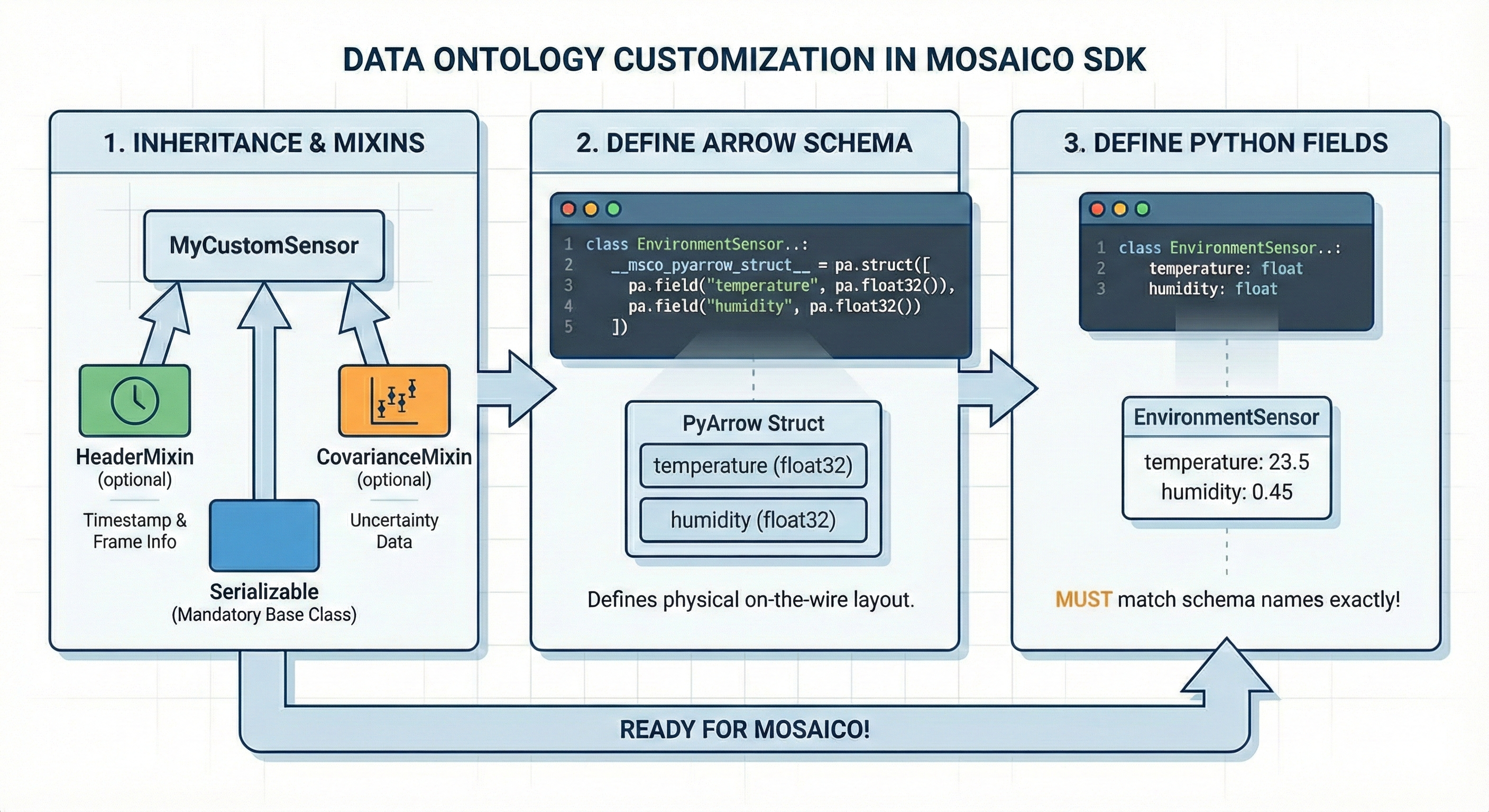
The Mosaico SDK is built for extensibility, allowing you to define domain-specific data structures that can be registered to the platform and live alongside standard types. Custom types are automatically validatable, serializable, and queryable once registered in the platform.
Follow these three steps to implement a compatible custom data type:
1. Inheritance and Mixins
Your custom class must inherit from Serializable to enable auto-registration, factory creation, and the queryability of the model.
To align with the Mosaico ecosystem, use the following mixins:
CovarianceMixin: Used for data including measurement uncertainty, standardizing the storage of covariance matrices.
2. Define the Wire Schema (__msco_pyarrow_struct__)
You must define a class-level __msco_pyarrow_struct__ using pyarrow.struct. This explicitly dictates how your Python object is serialized into high-performance Apache Arrow/Parquet buffers for network transmission and storage.
2.1 Serialization Format Optimization
API Reference: mosaicolabs.enum.SerializationFormat
You can optimize remote server performance by overriding the __serialization_format__ attribute. This controls how the server compresses and organizes your data.
| Format | Identifier | Use Case Recommendation |
|---|---|---|
| Default | "default" |
Standard Table: Fixed-width data with a constant number of fields. |
| Ragged | "ragged" |
Variable Length: Best for lists, sequences, or point clouds. |
| Image | "image" |
Blobs: Raw or compressed images requiring specialized codec handling. |
If not explicitly set, the system defaults to Default format.
3. Define Class Fields
Define the Python attributes for your class using standard type hints.
Note that the names of your Python class fields must match exactly the field names defined in your __msco_pyarrow_struct__ schema.
Customization Example: EnvironmentSensor
This example demonstrates a custom sensor for environmental monitoring that tracks temperature, humidity, and pressure.
# file: custom_ontology.py

from typing import Optional
import pyarrow as pa
from mosaicolabs.models import Serializable

class EnvironmentSensor(Serializable):
    """
    Custom sensor reading for Temperature, Humidity, and Pressure.
    """

    # --- 1. Define the Wire Schema (PyArrow Layout) ---
    __msco_pyarrow_struct__ = pa.struct(
        [
            pa.field("temperature", pa.float32(), nullable=False),
            pa.field("humidity", pa.float32(), nullable=True),
            pa.field("pressure", pa.float32(), nullable=True),
        ]
    )

    # --- 2. Define Python Fields (Must match schema exactly) ---
    temperature: float
    humidity: Optional[float] = None
    pressure: Optional[float] = None


# --- Usage Example ---
from mosaicolabs.models import Message, Header, Time

# Initialize with standard metadata
meas = EnvironmentSensor(
    header=Header(stamp=Time.now(), frame_id="lab_sensor_1"),
    temperature=23.5,
    humidity=0.45
)

# Ready for streaming or querying
# writer.push(Message(timestamp_ns=ts, data=meas))